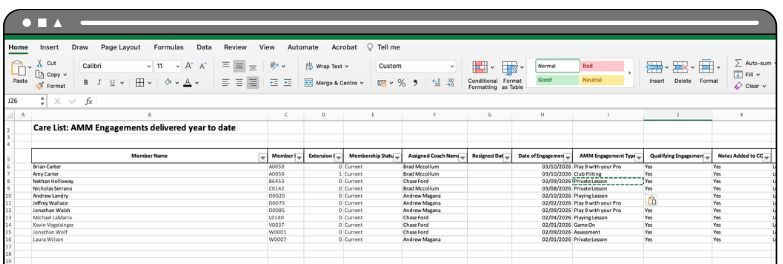
To support the recent AMM changes for 2026, a new report is available to those of you with managerial responsibilities over Care Groups and managing AMM at your club.
This new report is accessible at any time on the web and mobile web–based system and can be automated straight to your email inbox, keeping you right up to date with AMM engagements and activations at your club.
Accessing the Report
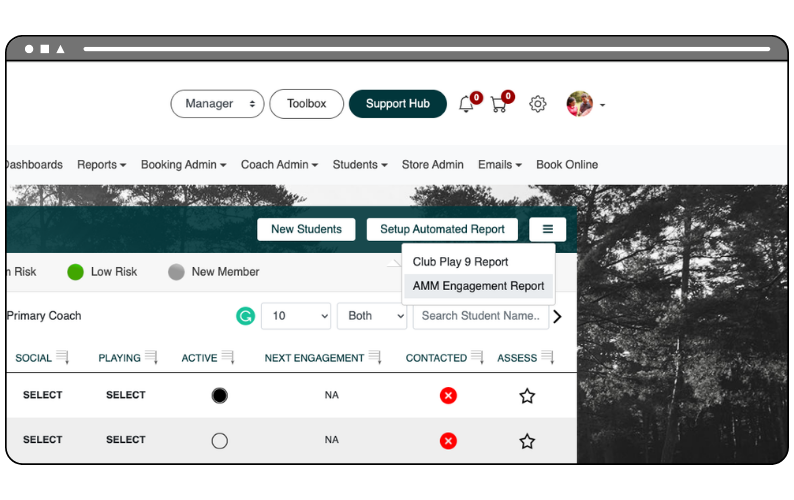
You can run the report at any time. To do this, navigate to the Customer Care List screen on the web and mobile web system via the Coach Admin menu navigation.
In the top right-hand corner of the screen, select the new action menu icon and choose AMM Engagement Report.
After a short period, the report will be exported straight to your device:
Setting up the Automated Report
You can automate the report to be sent straight to your email inbox on a weekly basis. The report has already been activated for you and is set to be sent on Mondays at 8am, specific to your academy’s time zone setting.
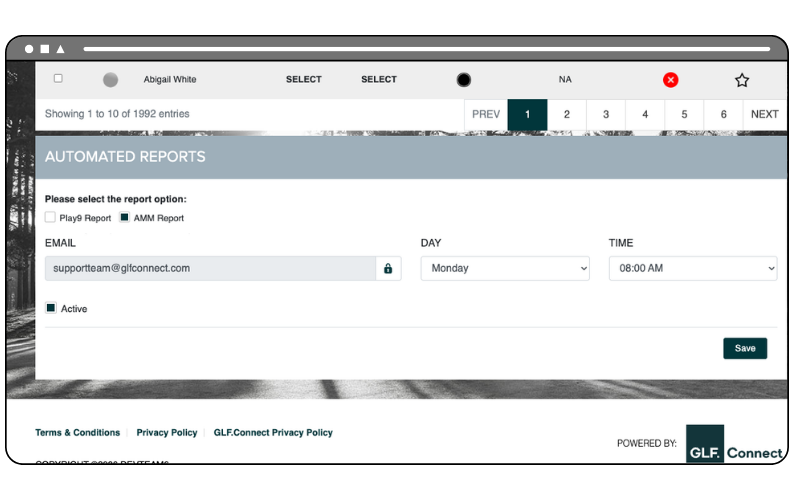
To amend this date and time, navigate to the Customer Care List screen and select the Setup Automated Report button in the top right corner.
You will then be taken to the automated report section at the footer of the screen. This section will display the report options available to you, and you can toggle across the available reports by selecting the checkbox and then defining the day and time that the report will be sent to the email address listed in your profile:
You can view a short how to video below showing you how to Setup your Automated Report:
Interpreting your Report
Whether you automate the delivery of your report or download it directly from GLF, it will be provided in Excel format. Both the Coach Play 9 Report and the Club Play 9 Report follow the same structure and contain the same type of information. The key difference is that the Club report shows data across all coaches within your GLF.Connect system, while the Coach report focuses on activity for an individual coach.
When you open the report, you will see a number of tabs, each designed to help you understand engagement with your coaching teams care lists and how AMM engagements and activations are progressing at your club.
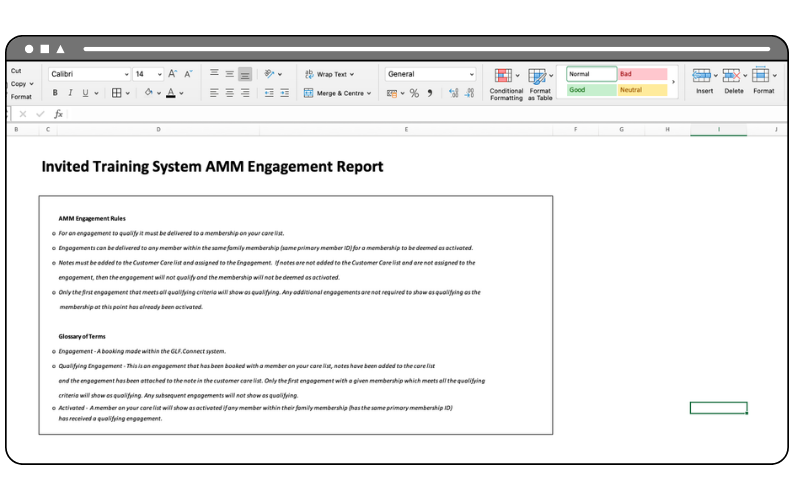
AMM Engagement Rules
This tab provides a quick reference explaining how engagements are counted within the report. It outlines the criteria that determine when a membership is considered activated, helping ensure you understand how the figures throughout the report are calculated:
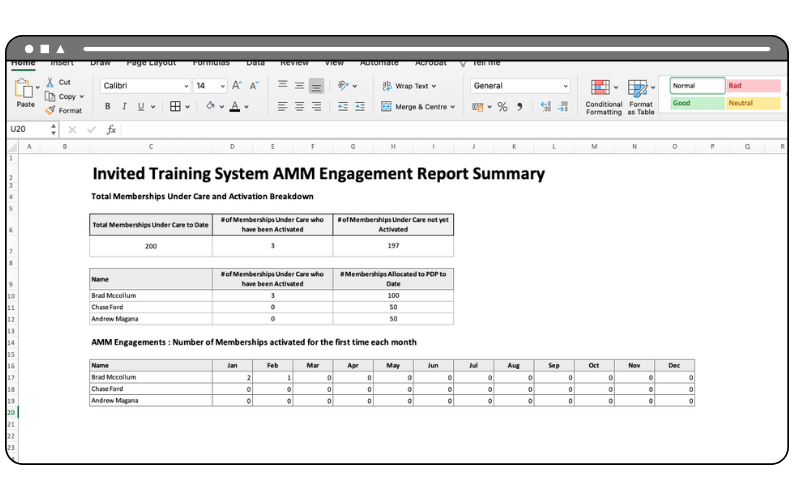
Engagement Summary
This tab gives you a high-level overview of engagement across your coaching team. It highlights the total number of memberships currently under care, how many of those memberships have been activated through a qualifying engagement, and how many are yet to receive one. It also provides a breakdown by coach, allowing you to quickly review engagement performance and monitor progress throughout the year:
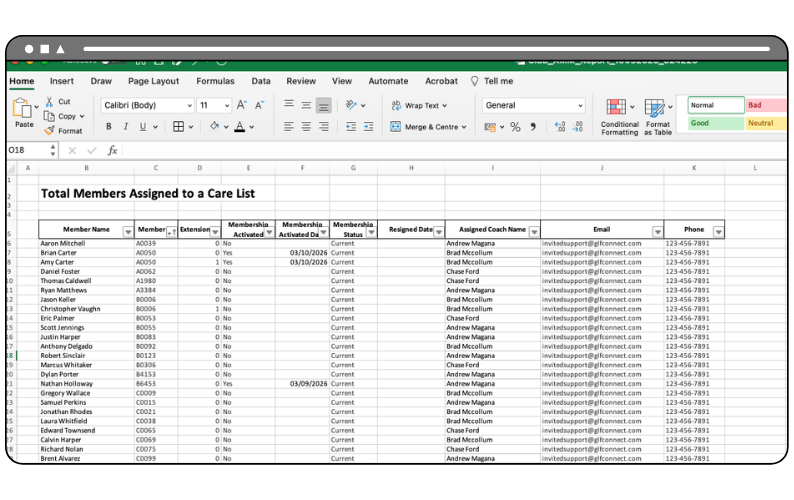
Care List
The Care List tab displays all members and thus memberships currently assigned to Care Lists at your club. From here, you can see whether each membership has been activated, when that activation occurred, and which coach is responsible for the member/ memberships:
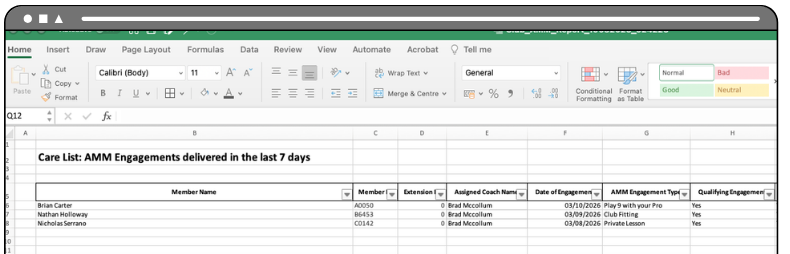
Last 7 Days
This tab shows all engagements delivered to Care List members within the previous seven days. It provides a recent activity view, allowing you to see which engagements have taken place, whether they qualify towards activation, and any notes recorded through the Customer Care List along with the answers to the drop down questions:
All Engagements
The final tab provides a year-to-date record of all engagements delivered across the coaching team, regardless of whether they are a qualifying engagement or not. This allows you to review historical activity, track ongoing engagement with members/memberships, and gain a clearer understanding of how interactions are developing over time: